Machine learning rig
Posted on February 28, 2024 • 5 minutes • 1038 words
Building a machine learning rig
This is my notes while building a machine learning rig.
After a bunch of research, I ended up with the following specs:
- CPU: Threadripper PRO 3995WX .
- Mainboard: Supermicro M12SWA-TF .
- Cooler: Enermax TR4 500W
- GPU: 1x NVIDIA 3090 24GB Founder Edition & 1x NVIDIA 5090.
- RAM: 256GB (8x 32GB stick) memory ECC DDR4 3200Mhz.
- Storage: 2TB SSD Samsung 970 EVO Plus .
- PSU: Forgot its name. It’s a 2000W PSU.
- Case: ASUS ProArt PA602 E-ATX .
- OS: Arch Linux
Picture
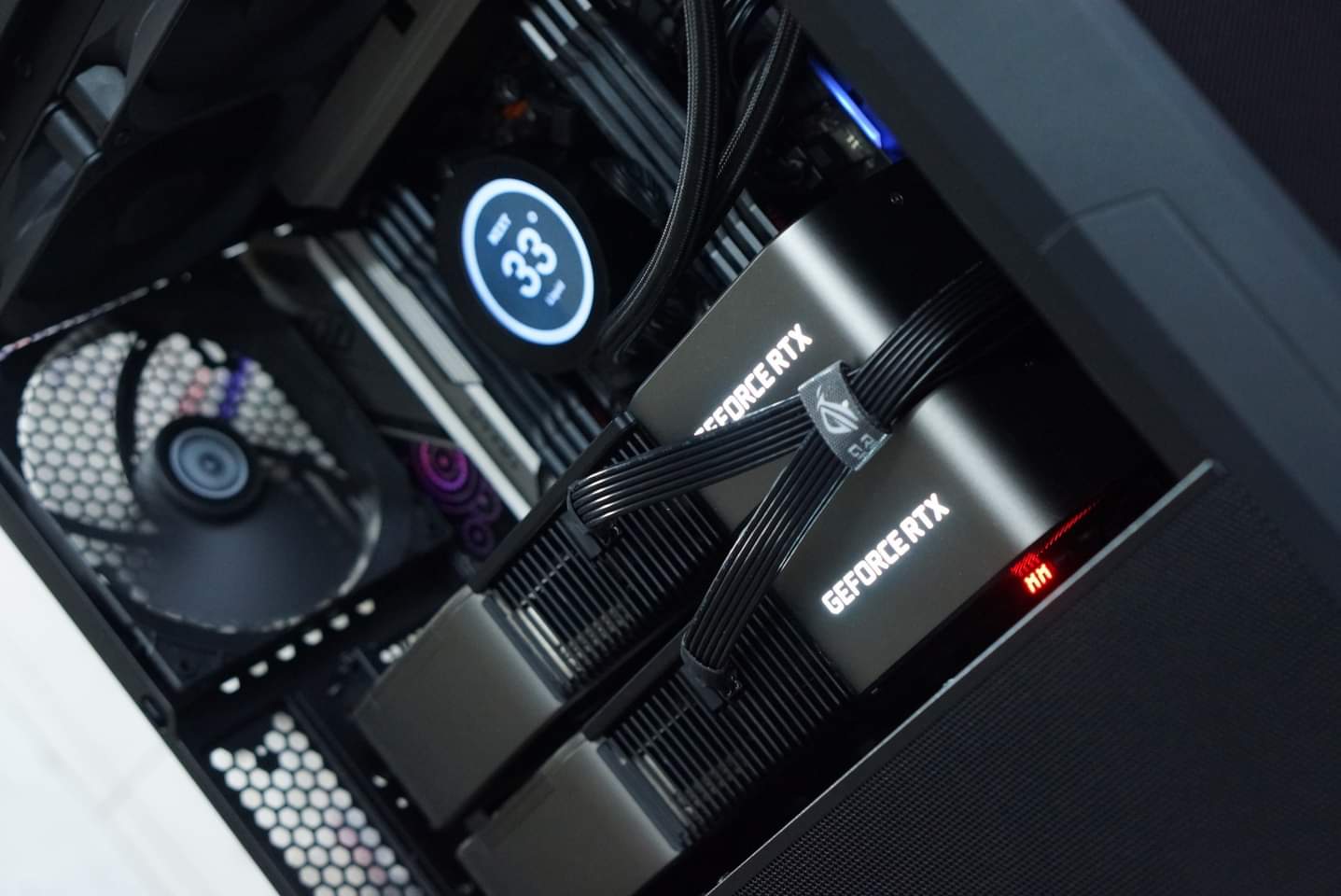
CPU
You need one with multiple PCIe lanes, which usually found in server CPUs since they have lots of memory. CPU specs doesn’t matter much for ML rig. I could have gone with Threadripper 1st gen and it would probably be fine.
GPU
What you want is lots of VRAM. I figure with 3090+5090 (originally 2x3090 but I later replace one with a 5090 down the road), I would be able to run 70B model with 4-bit quantization. Maybe I can add another card later and would be enough for 70B model + 8bit quantization.
General rule of thumb:
Take the parameter count in billions and multiply it by 2. This will tell you roughly how many gigs the full sized model requires.
The parameter count in billions is roughly equal to the 8-bit quants.
The parameter count in billions divided by two is roughly equal to the 4-bit quants.
So 70B model will have the following sizes:
Full = 140 gig
8-bit = 70gig
4-bit = 35 gig
Source: Reddit
PSU
I went with 2000W PSU. While others say that it’s fine with 3090+5090, I also went ahead and powerlimit the card to 280w limit. Make sure you have persistence mode turned on.
Minor, ignorable performance drop but greatly decrease thermal & power consumption.
- First, update
nvidia-persistenced.servicetopersistence-mode. - Create a new systemd service to set power limit on startup. Make sure it start after
nvidia-persistenced.service. - Verify it’s working after boot. It should looks like this with
nvidia-smicommand. Notice the Persistence-M is On and power limit is 280W.
+-----------------------------------------------------------------------------------------+
| NVIDIA-SMI 580.105.08             Driver Version: 580.105.08     CUDA Version: 13.0     |
+-----------------------------------------+------------------------+----------------------+
| GPU  Name                 Persistence-M | Bus-Id          Disp.A | Volatile Uncorr. ECC |
| Fan  Temp   Perf          Pwr:Usage/Cap |           Memory-Usage | GPU-Util  Compute M. |
|                                         |                        |               MIG M. |
|=========================================+========================+======================|
|   0  NVIDIA GeForce RTX 5090        Off |   00000000:41:00.0  On |                  N/A |
| 30%   37C    P8             53W /  600W |     788MiB /  32607MiB |      1%      Default |
|                                         |                        |                  N/A |
+-----------------------------------------+------------------------+----------------------+
|   1  NVIDIA GeForce RTX 3090        Off |   00000000:42:00.0 Off |                  N/A |
|  0%   28C    P8             12W /  350W |      15MiB /  24576MiB |      0%      Default |
|                                         |                        |                  N/A |
+-----------------------------------------+------------------------+----------------------+

+-----------------------------------------------------------------------------------------+
| Processes:                                                                              |
|  GPU   GI   CI              PID   Type   Process name                        GPU Memory |
|        ID   ID                                                               Usage      |
|=========================================================================================|
|    0   N/A  N/A            2693      G   /usr/lib/Xorg                           278MiB |
|    0   N/A  N/A            9132      G   /usr/local/bin/clipbud                    8MiB |
|    0   N/A  N/A            9375      G   /usr/lib/firefox/firefox                168MiB |
|    0   N/A  N/A            9376      G   /usr/bin/Telegram                         6MiB |
|    0   N/A  N/A            9377      G   /usr/bin/ghostty                         47MiB |
|    0   N/A  N/A           31520      G   ...U2gCY/usr/share/cursor/cursor        169MiB |
|    1   N/A  N/A            2693      G   /usr/lib/Xorg                             4MiB |
+-----------------------------------------------------------------------------------------+
Case
Any ATX case would do. I went with ASUS ProArt PA602 E-ATX. Most ATX desktop case would be able to house 3090+5090 cards. If you want to use 3 cards, you will have to use a smaller card, or bigger case.
OS
I went with Arch Linux and the good old i3-wm. Everything just works great out of the box.
Installation
I installed NVIDIA driver & NVIDIA container toolkit and do a simple test with hashcat & Tensorflow.
Simple benchmark with hashcat
paru hashcat
# hashcat -b -m <hash_type>
# -b: benchmark mode
# -m 0: md5 hash type
hashcat -b -m 0
Expected output
CUDA API (CUDA 12.3)
====================
* Device #1: NVIDIA GeForce RTX 3090, 23307/24258 MB, 82MCU
* Device #2: NVIDIA GeForce RTX 3090, 23987/24259 MB, 82MCU

OpenCL API (OpenCL 3.0 CUDA 12.3.99) - Platform #1 [NVIDIA Corporation]
=======================================================================
* Device #3: NVIDIA GeForce RTX 3090, skipped
* Device #4: NVIDIA GeForce RTX 3090, skipped

Benchmark relevant options:
===========================
* --optimized-kernel-enable

-------------------
* Hash-Mode 0 (MD5)
-------------------

Speed.#1.........: 70679.3 MH/s (38.63ms) @ Accel:128 Loops:1024 Thr:256 Vec:8
Speed.#2.........: 70505.2 MH/s (38.63ms) @ Accel:128 Loops:1024 Thr:256 Vec:8
Speed.#*.........:   141.2 GH/s
Tensorflow
Docker for everything :)
This is the command I use to launch a new container with Tensorflow
docker run -v $PWD:/workspace -w /workspace \
    -p 8888:8888 \
    --runtime=nvidia -it --rm --user root \
    tensorflow/tensorflow:2.15.0-gpu-jupyter \
    bash
Created a simple script to test it, named hello-world.py with following content and test.
#!/usr/bin/python3

import tensorflow as tf
hello = tf.constant('Hello, TensorFlow!')
tf.print(hello)
tf.print('Using TensorFlow version: ' + tf.__version__)
with tf.device('/gpu:0'):
    a = tf.constant([1.0, 2.0, 3.0, 4.0, 5.0, 6.0], shape=[2, 3], name='a')
    b = tf.constant([1.0, 2.0, 3.0, 4.0, 5.0, 6.0], shape=[3, 2], name='b')
    c = tf.matmul(a, b)
tf.print(c)
You can also launch Jupyter notebook in there and access it from the host machine via 127.0.0.1:8888.
jupyter notebook --ip 0.0.0.0 --no-browser --allow-root
SysFS had negative value (-1) error
Find GPU pci id with
ls /sys/module/nvidia/drivers/pci:nvidia/
# 0000:01:00.0  0000:21:00.0  bind  module  new_id  remove_id  uevent  unbind
And then
echo 0 | tee /sys/module/nvidia/drivers/pci:nvidia/0000:01:00.0/numa_node
echo 0 | tee /sys/module/nvidia/drivers/pci:nvidia/0000:21:00.0/numa_node
ref: StackOverflow
Or you can run this script to fix it.
#!/usr/bin/env bash

if [[ "$EUID" -ne 0 ]]; then
  echo "Please run as root."
  exit 1
fi
PCI_ID=$(lspci | grep "VGA compatible controller: NVIDIA Corporation" | cut -d' ' -f1)
#PCI_ID="0000:$PCI_ID"
for item in $PCI_ID
do
  item="0000:$item"
  FILE=/sys/bus/pci/devices/$item/numa_node
  echo Checking $FILE for NUMA connection status...
  if [[ -f "$FILE" ]]; then
    CURRENT_VAL=$(cat $FILE)
    if [[ "$CURRENT_VAL" -eq -1 ]]; then
      echo Setting connection value from -1 to 0.
      echo 0 > $FILE
    else
      echo Current connection value of $CURRENT_VAL is not -1.
    fi
  else
    echo $FILE does not exist to update.
  fi
done
Misc
nvlink
Apparently, you need this to better ultilize multiple GPU cards. The question remains whether you see it’s worth it or not. Some says that the performance gain is not worth it.